
You are using an out of date browser. It may not display this or other websites correctly.
You should upgrade or use an alternative browser.
You should upgrade or use an alternative browser.
try BIOS other and check GPU
Related services need additional purchase. ( Not included in the VIP )try BIOS other and check GPU
how much



I can help what ?hi
notbook xiaomi marble 17805-1 448.0ce09.0011 bios bin plees seend me
tainks
bios bin not displayI can help what ?
BIOS on top same problem ?bios bin not display
Hi.
Can you clean ME region?
i send 2 files:
original dump - laptop starts but no display - Xiaomi Mi Notebook Air TM1604 ver. xmakb3m0p1b13 SN 18864-00011688
i found working bios and change SN
working bios - long start 30 second to show picture Xiaomi - Mi Notebook Air TM1604 ver. xmakb3m0p0705 SN 18864-00011688
Can you clean ME region?
i send 2 files:
original dump - laptop starts but no display - Xiaomi Mi Notebook Air TM1604 ver. xmakb3m0p1b13 SN 18864-00011688
i found working bios and change SN
working bios - long start 30 second to show picture Xiaomi - Mi Notebook Air TM1604 ver. xmakb3m0p0705 SN 18864-00011688
Download list
I don't see anything related to Me Region and I think you know how to clear meHi.
Can you clean ME region?
i send 2 files:
original dump - laptop starts but no display - Xiaomi Mi Notebook Air TM1604 ver. xmakb3m0p1b13 SN 18864-00011688
i found working bios and change SN
working bios - long start 30 second to show picture Xiaomi - Mi Notebook Air TM1604 ver. xmakb3m0p0705 SN 18864-00011688
I tried to upload a clean ME region via Intel Flash tool Image.I don't see anything related to Me Region and I think you know how to clear me
It's the same after that. 30s long start to show the image and logo.
I do all the steps from guide how to clear me
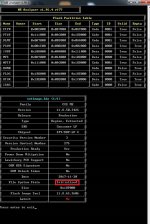
Should Files System State be Initialized or Configured?
Can you help?
Download list
After many tries, I was able to fix the long boot of my laptop.after clear me is Configured
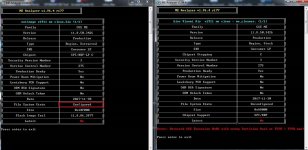
I did ME clean in a working bios and File System Status was Configured, but it was still a long 30s start to show the display.
Finally, I used the me_cleaner.py script from https://github.com/corna/me_cleaner. After programming the file "bios Xiaomi Air v1911 me clean - me_cleaner.py script.bin", the laptop starts up quickly and the dispaly is after 2s.
I know it's not the best solution, but it works.
Download list
w25q128fvsiq.bin.zipNO DISPLAY PLEASE REPAIR THIS FILE
hello boss, can you please clear me in this dump?
Download list
Please unlock bios passwordsame Motherboard
17805-1 ?
Download list
Similar threads
-

-
BIOS Xiaomi Mi Notebook Pro X15 oled TINYA30-6050A3283501-MB-A01(A1)
- Started by ThienBui
- Replies: 0
-
-
Schematics XM AIR 14 EU Xiaomi Mi Notebook Air 14 European version
- Started by ThienBui
- Replies: 0
-

