
You are using an out of date browser. It may not display this or other websites correctly.
You should upgrade or use an alternative browser.
You should upgrade or use an alternative browser.

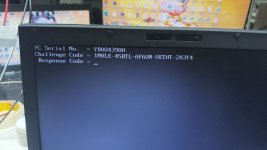
Please send one photo5L685799B0561453W
Hi, I had to turn off my laptop, here's the new one
pc serial no. = 5B053474H
challenge code = y3qw1-k0agu-3m141-5q816-ub2bm
It won't let me
|
Hi, in my country there's a problem with the power supply and they cut off the power as a precaution, but it's random. I can't keep the equipment on all the time. If it shuts down, can you send it back to me?
photo challenge code
The equipment turned off
Hi, I can't keep the computer on for that long, are you almost done?photo challenge code
Response Code = 0HKBB-G3CR3-NG315-YW26R-P0YAG
That wasn't it, my computer shut down and the challenge code changed, it's the last one I sent youResponse Code = 0HKBB-G3CR3-NG315-YW26R-P0YAG

Sent new codeThat wasn't it, my computer shut down and the challenge code changed, it's the last one I sent you

Enter the Response code (do not mix up "0" and "O" or "C" and "G" or "8" and "B")You will receive the "Response code"
Enter the Response code (do not mix up "0" and "O" or "C" and "G" or "8" and "B")
and press [ENTER] key.
The "TOSHIBA Setup Utility" (BIOS) appears.
Go to the "Securtiy" tab by pressing the cursor right key [->].
Check if the line "User Password Registered" is marked.
Press [ENTER] then [space bar] and [ENTER] key three times to set the password to "Not Registered".
Press [F10] key to save the changes and confirm this by pressing the [Y] key.
The BIOS Password is deleted.
Press F2 go bios setting and enter agian this code then unlock remember
Note: Please take photo or video when enter code
what is the mean by this line i didnt understand ?
unlock plz bios password

Unlock - Guide Unlock Toshiba via Response Code
Document details: Portege (A30, A600, M100, M200, M300, M400, M700, M750, M780, R30-A, R100, R200, R400, R500, R600, R700, R830, R930, S100, Z830, Z930, Z10T-A, Z20T-B, Z30T-A/B/C, X20W-D, X30-D) Qosmio (F20, F30, F60, F750, G10, G20, G30, G40...
 vinafix.com

CHALLENG CODE=2KF80-WNK4Y-X4GMA-1G6P8-1DA26Unlock - Guide Unlock Toshiba via Response Code
Document details: Portege (A30, A600, M100, M200, M300, M400, M700, M750, M780, R30-A, R100, R200, R400, R500, R600, R700, R830, R930, S100, Z830, Z930, Z10T-A, Z20T-B, Z30T-A/B/C, X20W-D, X30-D) Qosmio (F20, F30, F60, F750, G10, G20, G30, G40...
SERIAL NO,XA012861H
25$CHALLENG CODE=2KF80-WNK4Y-X4GMA-1G6P8-1DA26
SERIAL NO,XA012861H

Pay BUI DUY THIEN using PayPal.Me
Go to paypal.me/vinafixvip and type in the amount. Since it’s PayPal, it's easy and secure. Don’t have a PayPal account? No worries.
 www.paypal.com
Similar threads
-
Ask Toshiba Dynabook R632/H challenge code/ Response Code need
- Started by celsoh
- Replies: 11
-

-
-
-
