What's new

Dell Latitude 3480 Taos 16852-1 D5FVH

Star Rating
5.00 star(s)
Dell Latitude 3480
BIOS Taos 16852-1 D5FVH UMA, MEC1416-NU
Dell Latitude 3480/3488
Schematics Latitude 3480 3488 3580 16852-1 2-7 taos_kbl-u_a00_1223_1
boardview Dell Latitude 3480 - Taos - 16852-1 Boardview (.CAD).cad
16852-1.brd
16852-1 TOP.pdf
16852-1 BOTTOM.pdf
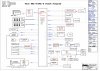
Screen Shot 2020-07-22 at 22.30.50.jpg
 

Download list

25L12873F.bin.zip
5.6 MB · Views: 1,707

Latitude 3480 16852-1 D5FVH 1.0.1.zip
5.5 MB · Views: 1,645


16852-1 TOP.pdf
332.7 KB · Views: 741

16852-1 BOTTOM.pdf
342.7 KB · Views: 679


Thank you for your previous effort with the Clean ME, but unfortunately, it did not fix the problem. The laptop still blinks 3 Amber and 3 White.
To isolate the issue, I flashed a completely different tested working dump on this board. The laptop turned on and gave a display immediately. This proves that my hardware is 100% fine, but the BIOS Region (or Descriptor) in my original file is deeply corrupted, which is why a simple "Clean ME" on the old file failed.
Could you please build a new file for me? Please use a known working clean BIOS region and transfer my original DMI data, Service Tag, and Windows Key from my attached original backup into it.
Here is my original corrupted backup again (Attached).
Thank you for your cooperation!
 
Hi ThienBui,
My laptop model is actually Latitude 3580. On the multi-platform screen, I correctly selected Latitude 3580 and pressed Enter.
Right after making the selection, the laptop went into a continuous shutdown loop (turns on for a few seconds, fan stops spinning, then cuts power completely).
This confirms that the ME Region / Thermal configuration for the 3580 profile in this file (⁠builds7.zip⁠) is incompatible or corrupted. Could you please fix the ME Region specifically for the Latitude 3580 configuration on this Wistron 16852-1 board?
Thank you for your help!
 
Back
Top