- Star Rating
- 5.00 star(s)
Download list
-
2mb [email protected]423.4 KB · Views: 54
-
32mb .bin.zip8.8 MB · Views: 90
-
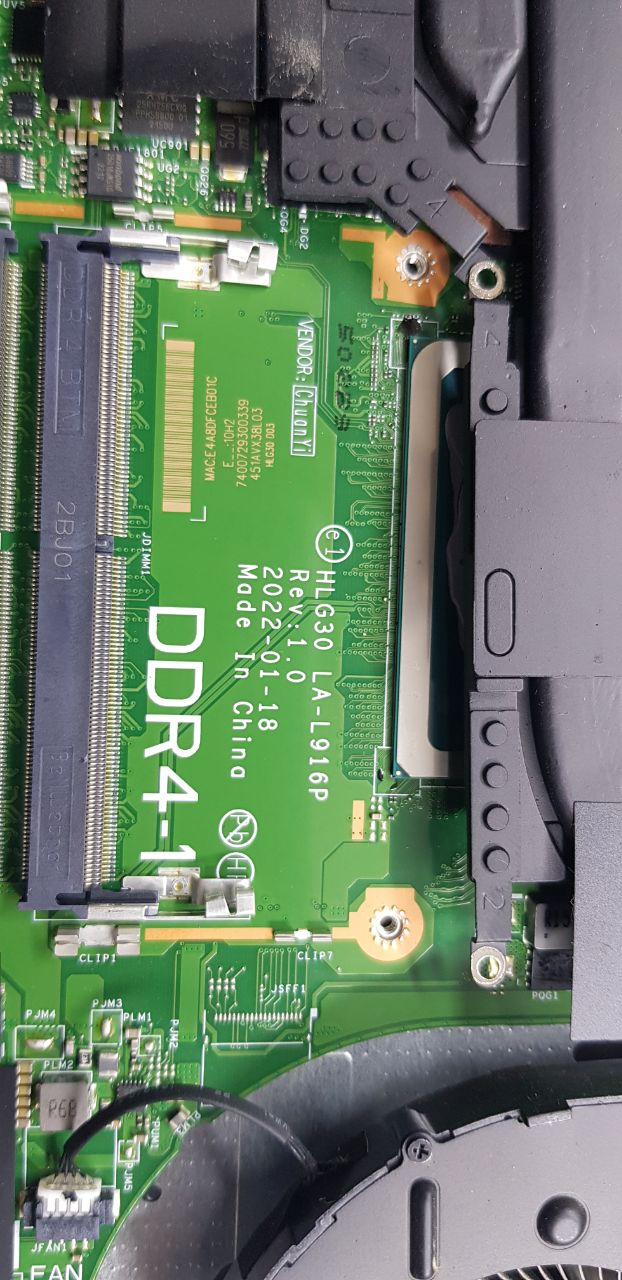
HLG30 LA-L916P rev 1.0 photo.zip11.4 MB · Views: 18
Last edited:
There is no display in the attached BIOS. I tried the BIOS you added in the first message of the thread, but it did not detect the graphics card or the NVMe SSD. Could you please fix the original BIOS?
try more bios new and check hardwareno screen.
I entered the main and EC that you shared in your first message, and the display came up. However, it did not detect the NVMe and did not recognize the GPU (GPU: RTX 3050 Ti).Daha fazla BIOS güncellemesi deneyin ve donanımı kontrol edin.
nvme, you must buy a $35 patch to fix itI entered the main and EC that you shared in your first message, and the display came up. However, it did not detect the NVMe and did not recognize the GPU (GPU: RTX 3050 Ti).
Lütfen bunu clean yapar mısın?NVMe'de sorun varsa, düzeltmek için 35 dolarlık bir yama satın almanız gerekiyor.
Ekran kartıyla ilgili olarak ise bunun BIOS ile bir ilgisi olup olmadığından emin değilim.
Lütfen bunu clean yapar mısın?
NO WORK
NO IMAGE, PLEASE CHECK AGAIN.
right now is no display ?Problema principal:
La pantalla no mostraba nada.
La reprogramé con la BIOS del fabricante y ahora sí muestra nada, pero la tarjeta gráfica no se activa. ¿Podrían ayudarme a solucionarlo?
Investigué y parece que se debe a un error de reparación de la BIOS.
IDEAPAD GAMING 3
SN: MP2CA6M1
METROTM: 82SA00FMLM
MO: MPNXB2A17056
ID DE FÁBRICA: PRC4
Si la hay, pero con grafica de procesador y no detecta grafica dedicada¿Ahora mismo no hay ninguna pantalla?
GPU can not check from biosSi la hay, pero con grafica de procesador y no detecta grafica dedicada
No, sale N/ALa GPU no se puede comprobar desde la BIOS.
bootloop no image/no boot