Ask GM5PG3E Schematics

Question & Answer Forums
Hello,

Gm5pg3e rev 1.1

Can you repair this BIOS dump?

The laptop powers on and displays an image normally, but the BIOS settings are not being saved. After changing any BIOS setting and saving, the settings are reset again after reboot.

The RTC battery is good, and the date and time are saved correctly. So the problem does not seem to be related to the RTC battery.

There is also another issue: when I try to boot from a USB flash drive, the USB drive appears in the boot menu, but after selecting it, the laptop behaves as if the USB drive is empty and returns to the boot selection screen.

Could you please check and repair the BIOS dump, especially the NVRAM / UEFI variable store / boot-related sections?
 

Download list

Hello,

Gm5pg3e rev 1.1

Can you repair this BIOS dump?

The laptop powers on and displays an image normally, but the BIOS settings are not being saved. After changing any BIOS setting and saving, the settings are reset again after reboot.

The RTC battery is good, and the date and time are saved correctly. So the problem does not seem to be related to the RTC battery.

There is also another issue: when I try to boot from a USB flash drive, the USB drive appears in the boot menu, but after selecting it, the laptop behaves as if the USB drive is empty and returns to the boot selection screen.

Could you please check and repair the BIOS dump, especially the NVRAM / UEFI variable store / boot-related sections?
 

Download list

Hello,

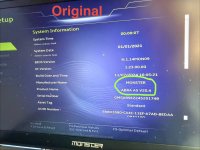
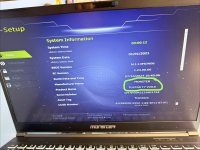
When I checked the BIOS dump file that I asked you to repair, I noticed that a different laptop model number is shown on the BIOS screen.
My model no is ABRA A5 V20.4

However, in the original BIOS dump file that I shared with you and asked you to repair, the correct model number is displayed.

Could you please repair my original BIOS dump file properly?

The issue is: the laptop does not boot. It saves the date and time correctly, but it does not save any other BIOS settings changes.
 

Download list

Hello,

When I checked the BIOS dump file that I asked you to repair, I noticed that a different laptop model number is shown on the BIOS screen.
My model no is ABRA A5 V20.4

However, in the original BIOS dump file that I shared with you and asked you to repair, the correct model number is displayed.

Could you please repair my original BIOS dump file properly?

The issue is: the laptop does not boot. It saves the date and time correctly, but it does not save any other BIOS settings changes.
I don't see anything wrong with the file above
 
What I mean is that in the original BIOS dump file I uploaded for you to repair, the laptop model name is shown as ABRA A5 V20.4.

However, in the repaired file you provided, the model name appears as TULPAR T7 V20.6.

Could you please repair the BIOS file using my original faulty BIOS dump file that I uploaded, while keeping the correct model information?
 

Download list

From the photo you provided, it shows that the laptop still works normally, why do we need to repair it??
Thank you for your reply.


Although the laptop appears to work normally in the photo, it actually has a serious BIOS-related problem.


The laptop cannot boot properly. Also, the BIOS does not save any settings except the date and time. For example, if I change the boot order or any other BIOS setting, the changes are lost after restarting.


Another issue is that when I try to boot from a USB flash drive, the laptop detects the USB device, but it behaves as if it were empty and cannot boot from it.


This laptop is very important to me, and I really need to get it repaired.


If it is possible, I would be very grateful if you could repair the original BIOS dump that I uploaded instead of replacing it with a BIOS from another model. I would really appreciate your help.


Thank you very much in advance.
 
So what do you want me to do with this bios file? I can't find another BIOS for this model. There are very few products on the market.
 

Latest posts

Back
Top