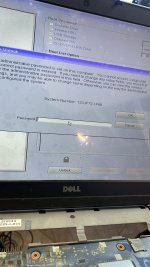
clear me please
clear me giùm e file này với a thiện máy 20s mới lên hình
CLEARME nó chỉ như vậy thôi không có lại, muốn lại thử nạp file khác.file này lên nhanh hơn tầm 10s nhưng dính 30p lại tắt a clearme lại giúp e với ạ
send two biosfile pass
Send lock photo can generate password your tag.remve passwrd please
Send lock photo can generate password your tag.
try it not working sir12XJF72-1F66
5 - 5 ( digit )
e - echo ( lowercase )
5 - 5 ( digit )
t - tango ( lowercase )
e - echo ( lowercase )
h - hotel ( lowercase )
6 - 6 ( digit )
v - victor ( lowercase )
x - x-ray ( lowercase )
g - golf ( lowercase )
L - LIMA ( UPPERCASE )
K - KILO ( UPPERCASE )
9 - 9 ( digit )
r - romeo ( lowercase )
C - CHARLIE ( UPPERCASE )
7 - 7 ( digit )
PASSWORD#2
m - mike ( lowercase )
L - LIMA ( UPPERCASE )
x - x-ray ( lowercase )
L - LIMA ( UPPERCASE )
k - kilo ( lowercase )
B - BRAVO ( UPPERCASE )
z - zulu ( lowercase )
k - kilo ( lowercase )
4 - 4 ( digit )
1 - 1 ( digit )
e - echo ( lowercase )
8 - 8 ( digit )
r - romeo ( lowercase )
N - NOVEMBER ( UPPERCASE )
L - LIMA ( UPPERCASE )
M - MIKE ( UPPERCASE )
Please read the instructions CAREFULLY.try it not working sir
i sent you 2 passwordtry it not working sir
done thanxPlease read the instructions CAREFULLY.
INSTRUCTIONS:
- Type the 16-character password. For UPPERCASE characters use SHIFT key. Take your time while typing password, my suggestion is to use NATO Phonetic guide under password (a-alpha, B-BRAVO, C-CHARLIE...).
- Once you are done typing password, hold down left CTRL key and press ENTER key twice (CTRL-ENTER-ENTER).
(Password is to be typed using a standard US QWERTY keyboard).
NOTE: Sometimes if using master password within Setup/BIOS, just pressing ENTER after typing password will do.